Online shopping is becoming a growing demand whether we like it or not. The percentage of sales happening on mobile devices is climbing on a steady pace. Large and small businesses are on the race when it comes to launching mobile apps in the hopes of capturing ecommerce dollars. But for every successful app, there are dozens that go down the drain.

Ever wonder what makes a top-rated app stand out from those that disappears over time in iTunes and Google Play? Here are five things every business mobile app needs in order to succeed.

1. Interactive content


For some mobile apps, we would notice that they are just plain and canned version of their company's website, which makes it unimpressive to the users. Let's take the Gap app for example: it's nothing but a packaged website, which makes the reviews not very favorable from the consumers. It doesn't make sense installing an app when you can just view the same thing on your mobile device's browser, right?

On the other hand, successful apps like the Nike+, gives the users to install it as it interfaces with fitness apps to track your activity, delivers advice from athletes based on your interests and needs. Nike+ encourages you to play with it and provides users something useful in return, which keeps them coming back. Making a business app as interactive as possible will surely catch your customers attention.

2. A reason to keep coming back

A good example for integrating a brand with a platform is Under Armour's MapMyFitness app. MapMyFitness offers running, biking, walking, hiking, and calorie-tracking apps; you can shop Under Armour gear in all the apps, but that's not the actual reason why they're so in-demand.

The MapMyFitness platform keeps users coming back every day to track workouts, record routes, participate in challenges, and log meals. Research suggests branding on mobile devices improve purchase intent, and even minimal brand impression can build a positive association. The Under Armour name may not be so much "in your face" in the MapMyFitness platform, but there's enough chance for it to be noticed.

3. Added value


It's not enough that a mobile app is successfully installed in someone's mobile device -- it needs to have a bigger reason why a consumer should use it and spend money with your company. Starbucks' mobile app, for instance, lets users order straight from their phones and pick the order up from the store. Starbucks then bills the app as a way to avoid falling in line and wait to get your ordered coffee, which is a major added value for its customers.

Without the app's special feature, the Starbucks app would simply serve as a store locator and a points tracker, which is a common thing for most mobile business apps. Offering customers that option to order through the app is something innovative and provides a lot of convenience, which gives people a good reason to install it, while giving the company a leg up in the competition.

4. A good interface

Again, there are several apps that possess poor interface. Businesses should keep in mind that they should not mess with the basic ways users interact with their device. If your app, for example, doesn't allow swiping to go back a page, nor does tapping on the top of the screen return you to the top. These are two gestures that iOS users are greatly familiar with, and if you want your app to succeed you need to leave these -- and other basic commands -- in place.

Apps that get bad reviews can affect your brand in a negative way, while high ratings can drive a huge amount of business opportunities. User interface is fundamental to an app, and no amount of added value, uniqueness, or interaction is going to overtake a clunky homescreen.

5. Regular updates


Regular updates, both for quality improvement and feature addition, can increase an app's success rate by roughly three times than that of less updated ones. If you're not sure it's worth updating an app frequently, it's better to check the app's ratings section on iTunes or the Google Play page. Each update brings a new flood of complaints and requests, and keeping up with them is easily a full-time update schedule.

It's also a good idea to include feedback function in the app itself. While it doesn't guarantee users will respond, it at least encourages them to submit comments directly to your team.


As back to school draws nearer for every school and university across the nation, it cannot be denied that more students are becoming aware that they will soon shoulder the burden of living on their own, and do their own daily living expenses. For some of us who have already experienced or are currently living on our own, we know that those estimates and budget lists go to the trash when the first bill arrives and reality slaps us hard in the face.

If you're planning of moving out on your own, you don't need to worry that much because there are already great tech tools out there that can help you come up with more accurate budgeting costs. So if you want living your life away from home easier, check out the list we have for you below.

1. Cost of living Calculator

The most important thing that you should know if you're planning to move out is to understand the average cost of living in the city you're moving in to. Even if you're moving from a suburb of the city you plan to move to, costs could very greatly due to market demand. So, in order for you to get a better and clearer idea of what your expenses might look like, try running your information via the cost of living calculator. This tool will help you get a general number in mind before into more personalized estimate tools.


2. Utility cost calculator

No matter who you are or where you move, utilities are an essential cost. This is why calculating costs for things like water, gas, and electricity prior to leaving the nest is an important step in identifying what your monthly spending will look like. Utility costs usually very depending on the time of the year, your intended usage, and your location. Smart energy-saving tips like moderately setting AC and heat settings and turning off the lights when you leave a room can help, but it can still be tough to control how much you will be spending.

You can use a utility cost calculator to help you calculate the average cost of electricity in your home based on the information you provide about your location, usage, and number of people in your household.


3. Insurance calculation tools

Not only as an important part of protecting your home, but renter/home insurance is also required by most rental situations and necessary to get a loan approval if you're planning to purchase a home. Although the cost of insuring your home is usually pretty low, it's still important for you to get an estimate for the service that you can figure in to your estimated living costs. And if by leaving your home means you'll also be required to pick up your auto insurance, you'll want to include the costs for that as well. Luckily, most insurance companies allow you to bundle your renter/home insurance with your car insurance plan.

To help you know how much your insurance might cost you per month, consider using an insurance calculator to determine your potential needs based on the coverage your specific situation requires.


4. Gas Buddy

Aside from those expenses mentioned, you also need to determine your overall spending in gas. Although it can be pretty difficult to predict exactly how much you'll be driving/spending on fuel, a rough estimate can help at least get an idea of the amount you will be spending on your daily commute to work and school in a new town or city. With this, use the Gas Buddy tool to assist you generate fuel cost estimates for the route you will be taking regularly. This will help you get a better visibility of how much you should add to your monthly expenses in terms of fuel.


5. Level Money App

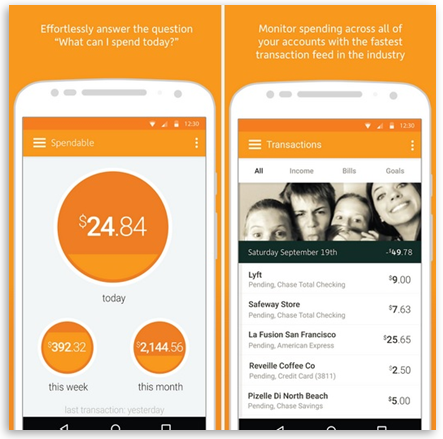
Once you have all of your estimated monthly bills, use the Level Money app to add them up and compare them against your monthly income. From here, the app will generate a monthly budget that can guide your financial decisions for budgeting expenses for things like entertainment, leisure, and shopping.


With iPhone 7's latest rumor that it will be released in less than a month from now, we can't help but wonder what new features and look it will offer to its consumers. Will it have a 1080p screen? How about waterproof? Is Apple making special headphones for it? It could be a huge change this year, considering that the iPhone 6S is somewhat underwhelming as it doesn't brought anything amazing aside from the fancy 3D Touch technology.

Straight to the Point
  • What is it? A rebooted iPhone with new powers, features, and design
  • When will it come out? Target date is on September 7th
  • How much will it cost? Most likely it will be the same as the iPhone 6S
iPhone 7 Price
The iPhone 7 price is rumored to be around US$649 (£539, AU$1079) but here's the good news -- for that price, you'll most likely to get 32 GB of storage instead of 16 GB. Bottomline is, there will be a larger base storage option, but there will be very little price increase as the iPhone is already at the peak of acceptable cost.

iPhone 7 Design

Highlights:
  • Water resistance
  • Bezel-less metal body
  • Redesigned antennas

Well heads up for Apple fans, because there's a slight disappointment on this side: it might be very similar outside of a few tweaks here and there. There's a new color option though, since there are rumors that iPhone 7 will be adding Space Black shade to the mix, likely similar to the black Apple Watch option.

Another latest rumor is said to be pushing a blue variant, too. You can see the likely shape of the new iPhone in the image above, showing off the redesigned antenna bands and a single lens snapper.

Slimmer Look


The soon-to-be-released iPhone 7 is said to be slimmer than the 7.1mm-thick iPhone 6S. Though rumored to be around 6-6.5mm thin, it will beat Samsung Galaxy S6 at 6.8mm. Another report claims Apple will be using fan-out technology to save space and reduce the thickness of the iPhone 7.

Is it Going to Be a Waterproof Phone?
Apple screen supplier Japan Display has come up with a new technology called "Pixel Eyes," which is now on its second generation that makes it easier to use the screen while you have wet fingers. However, another report has mentioned that Apple will opt for a slimmer iPhone 7 rather than a waterproof one. Apple will likely get a new LCD technology as well, which could allow the iPhone 7 to be 1mm thinner than before.

iPhone 7 Screen

Highlights:
  • A 1080p screen
  • An edge-to-edge display
  • No OLED technology for this year

Apple is apparently likely to move to glass-on-glass screens, which opens up the possibility of a QHD or even a 4K display. However, Apple's first move will surely be getting both handsets up to 1080p sharpness, as has also been rumored and is expected to have 4.7-inch and 5.5-inch models.

iPhone 7 Camera and Battery

Highlights:
  • A larger, single-lens sensor
  • No more camera bump
  • A larger battery
Apple overhauled its camera technology for the iPhone 6S, replacing its old 8 MP snapper with a shiny new 12 MP and then gave the front camera a boost of up to 5 MP. For one thing the standard iPhone 7 may get optical image stabilization along with the larger iPhone 7 Plus. A recent leak suggests that Apple will increase the battery size for the iPhone 7 while still being able to reduce the thickness.


iPhone 7 OS and Power

Highlights:
  • A hexa-core processor
  • 3 GB of RAM
  • iOS 10
iPhone 7 is being groomed to launch alongside iOS 10, and it's a tremendous feature upgrade over iOS 9.3. It will introduce a much smarter Siri that can command third-party apps, new Messaging functionality and a convenient Raise to Wake way of lighting up the phone.

It won't stop with a software upgrade under the hood. iPhone 7 could be in for a huge performance boost, with rumors that the phone will pack a hexa-core Apple A10 chip.

iPhone 7 Other Features

Highlights:
  • A pressure-sensitive home button
  • Wireless charging


While the iPhone 7 is greatly expected to look similar to the iPhone 6S, it could be a purely different beast inside. It has also been reported that the iPhone 7 will be "more complex" to manufacture than any previous iPhone, suggesting there could be a lot more going under the hood.

You're now in college. At last, you're free to do anything you want your parents have been restricting you to do when you were in high school. Now, you can have all the liberty to have all the party and booze, like the ones you see in the movies. But most of all, don't forget that college life is also about studying and learning new and worthwhile stuffs, too.

Aside from that, college life can also be confusing and challenging at the same time. It can be difficult, at first, to find your footing in a social way. Thanks to technology, you can easily touch the World Wide Web with your own hands. Here is a collection of apps that will surely kick start your college social life.

Twitter
Don't be the only person in class who isn't updated with the world events. Use Twitter to keep yourself in the loop in both the academic and social aspects of your college life. In today's contemporary classrooms, you may even be asked to participate in class discussions via Twitter.

The app is available for free for iOS and Android devices.

Between
Are you someone whose attempting the long-distance relationship course? Kudos to you because that's not a small task to deal with. Relationship app Between can help you ease the separation anxiety by letting you send messages, voicemails, memos, and photos. A private timeline makes it easy to reminisce about the good old days with your significant other or loved one(s).

Between can be downloaded for free by iOS and Android users.

Skype
Video interviews are not going away any time soon -- so you might as well get a heads up now. Microsoft's Skype is a reliable way to connect with faraway family and friends via text, voice, and of course -- video.

It is available for free on iOS and Android devices.

LinkedIn
LinkedIn and all its nifty features makes connections a breeze -- for better or worse, college is a time of both personal and professional connections.

The LinkedIn app is available for free on the Internet, of course, but you can also get it for free for iOS and Android devices.

Afterlight and Over
These days, anyone with an Instagram account can call themselves an amateur photographer of sorts. But with these two apps, you can even make more beautiful pictures to put on your blog or social media accounts. Afterlight is an app that has lots of shape, formatting, and filters to make your pictures really beautiful. And Over is an amazing app that lets you put text on your pictures. What makes these two photo apps stand out specifically are that they are super sleek and classy, so really nothing that you do to your photos with both of them makes your pictures ten times better looking. Of course, these are more for your average Facebook/Insta use and not for professional photography per say, but anyone of any expertise can use them to make pictures really nice. With these apps, you won't be able to stop editing.

Meetup
Let's face it, when you graduate into the real world, you're not going to have all your friends living within a mile radius for you to hang out, party, or go to football games with. So realistically, if you are new to the place or the city, or even just interning for a couple of months somewhere, it helps to join a group who has similar interests or backgrounds. And that may sound terrifying, or Tinder-esque, but the whole point is to find an entire group of people to hang out with and get to know. So maybe consider taking a buddy with you, or ask around about activities, but give it a try so you'll get used to your new home.

Click here to download Meetup for free.


The Internet offers a huge amount of information regarding any topic that can possibly exist, but every website has its own way of showing the people its information. There are lots of websites that show off a clean interface, along with an ad or two on the side, and a few content recommendations. While there are some that will bombard you with tons of ads, videos, recommendations, and so on, making it clutter-some.

There are various tools will help you make websites easier to read and help you focus on the content that really matters to you. Check out these three tools that can you help you clean websites so that it will be easier for you to browse along, as well as read its contents in a clearer perspective.

Readability

The Readability tool is an extension for Chrome, Firefox, and Safari that lets you remove all the clutter including ads, recommendations, dialogs, social buttons, cooments, and almost everything distracting, and extract the actual content. It will only display the website name, the actual text content, photos/videos within the content, and all the links in it. All you need to do is install the extension in your favorite browser, then proceed in opening any article online. Next, click on the Readability extension button located at the upper right hand corner of the browser, and then select the Read Now option. The page will refresh after a delay, and you will notice that all the clutter will disappear.

Furthermore, you have complete control as to how you want the extracted content to look, including the ability to change the content size, day and night mode, and layout. If you suddenly ran out of time, you also have the option to save the article to read later, which you can choose right from the Readability extension button. (You need to sign up for this feature)

The Readability tool is compatible for Android and iOS devices.

Microsoft Edge's Reading View

Microsoft Edge comes with a built-in reading view that is fast and reliable. When you visit an online article, Edge will show a "Book" icon in the address bar. Simply clicking on it will remove all the unnecessary clutter and will just show the main site content. Be informed though that this tool doesn't offer any customization options. You will only get an easy-to-read webpage without any options to save or customize its look.

Firefox Reader View

If you happen to be a Firefox user, there's no need for you to use any third-party tool in order to make your life easier whenever you read websites. Firefox comes with a simple Reader View button (an open book icon) that you can find at the address bar, which when clicked will immediately clean the website and will show only the main content that you need. Similar to the Readability tool, you can also change the site's font style, layout, and even the background according to your preference.

You can also save your favorite articles with its saved to Pocket option so that you can easily view it later and to manage your reading lists. What's good about this browser feature is that it quickly makes a website easier to read unlike with Readability, in less than a couple of seconds, that is.