Showing posts with label android. Show all posts


Have you noticed lately that your ageing Android tablet can't keep up with your daily pace anymore? If it is but somehow it's not valuable enough to trade it or sell it on eBay doesn't mean you have to throw it in the trash or leave it eating dust on your drawer.

From turning it into a security camera to converting it into a smart remote or even handing it down to your kids, below are some great uses you can turn your old Android tablet into.

Security Camera


If you want to keep an eye on your home, you can use your old Android tablet as a connected security monitor. You can use either its front or rear cameras to keep an eye on your home or office. There are several apps that make it easy to convert your old Android device or devices for home security like the At Home Video Streamer. Just make sure that it is setup with a stand or mount and keep the device plugged in.

Universal Remote Control


Another useful thing that you can do with your old Android tablet is to use it as a universal remote that can change the TV channel, turn on your lights, or turn down the thermostat of your home airconditioning. Most smart-home apps operate over Wi-Fi or Bluetooth, and you can control many smart TVs over Wi-Fi.

However, if you're using a more traditional TV, you'll need your tablet to have an infrared port, also known as an IR blaster. This feature can be found on about 20 tablets only, mostly from Samsung and LG, but you can check if your tablet does by reading your instruction manual or looking for a small covered hole on the side of your device.

If your tablet doesn't come with a remote control app preloaded, Peel Smart Remote is a great choice, as are AnyMote Smart Remote or Irdroid. If your smart-home devices or hub don't already have an app, you could use iRule or OnHome.

Digital Photo Frame and Photo Album


You can save about $50 to $100 for digital photo frames by using your old Android tablet instead. Turn your tablet into a photo frame with the help of apps from Play Store, such as Photo Slides. You'll need to load all the photos you want onto the old tablet and then place the device somewhere near an outlet so it can remain plugged in at all times. If you have extra bucks, you can purchase an inexpensive stand like theAmazonBasics Adjustable Tablet Stand to keep your tablet propped up and easy to view.

Backup Drive


Your computer's storage drive contains tons of important data, from your family photos to your work files. But no matter how secure your laptop or computer is, a single hardware or software failure can easily wipe out all your years of memories and hard work.

You can install an app like the Wi-Fi File Server Free, which will allow you to turn your old tablet into a wireless backup server. This will help you keep a copy of your file available at all times on your local network or even on the Internet. This is particularly helpful if you have a tablet with a microSD card slot and a high-capacity card inside.

Reference Library


Does your profession require you to keep a lot of books for your reference? Well, good news because you can take your old Android tablet and use all of its available storage as a reference library for your books. In fact, many Androids tablets feature a microSD card that can expand your storage, helping you add many more books to your collection.

If you want to have a large storehouse of information available that doesn't require any Internet connection, you can download the Kwix app. This app lets you download offline Wikipedia, WikiLeaks, and other free reference materials. A good source from which to purchase reference materials would be either Amazon's Kindle Store (download the Kindle app first) or Google Play Books. There are lots of free titles that are free of charge, and you can search as many books as your tablet storage will allow.


As back to school draws nearer for every school and university across the nation, it cannot be denied that more students are becoming aware that they will soon shoulder the burden of living on their own, and do their own daily living expenses. For some of us who have already experienced or are currently living on our own, we know that those estimates and budget lists go to the trash when the first bill arrives and reality slaps us hard in the face.

If you're planning of moving out on your own, you don't need to worry that much because there are already great tech tools out there that can help you come up with more accurate budgeting costs. So if you want living your life away from home easier, check out the list we have for you below.

1. Cost of living Calculator

The most important thing that you should know if you're planning to move out is to understand the average cost of living in the city you're moving in to. Even if you're moving from a suburb of the city you plan to move to, costs could very greatly due to market demand. So, in order for you to get a better and clearer idea of what your expenses might look like, try running your information via the cost of living calculator. This tool will help you get a general number in mind before into more personalized estimate tools.


2. Utility cost calculator

No matter who you are or where you move, utilities are an essential cost. This is why calculating costs for things like water, gas, and electricity prior to leaving the nest is an important step in identifying what your monthly spending will look like. Utility costs usually very depending on the time of the year, your intended usage, and your location. Smart energy-saving tips like moderately setting AC and heat settings and turning off the lights when you leave a room can help, but it can still be tough to control how much you will be spending.

You can use a utility cost calculator to help you calculate the average cost of electricity in your home based on the information you provide about your location, usage, and number of people in your household.


3. Insurance calculation tools

Not only as an important part of protecting your home, but renter/home insurance is also required by most rental situations and necessary to get a loan approval if you're planning to purchase a home. Although the cost of insuring your home is usually pretty low, it's still important for you to get an estimate for the service that you can figure in to your estimated living costs. And if by leaving your home means you'll also be required to pick up your auto insurance, you'll want to include the costs for that as well. Luckily, most insurance companies allow you to bundle your renter/home insurance with your car insurance plan.

To help you know how much your insurance might cost you per month, consider using an insurance calculator to determine your potential needs based on the coverage your specific situation requires.


4. Gas Buddy

Aside from those expenses mentioned, you also need to determine your overall spending in gas. Although it can be pretty difficult to predict exactly how much you'll be driving/spending on fuel, a rough estimate can help at least get an idea of the amount you will be spending on your daily commute to work and school in a new town or city. With this, use the Gas Buddy tool to assist you generate fuel cost estimates for the route you will be taking regularly. This will help you get a better visibility of how much you should add to your monthly expenses in terms of fuel.


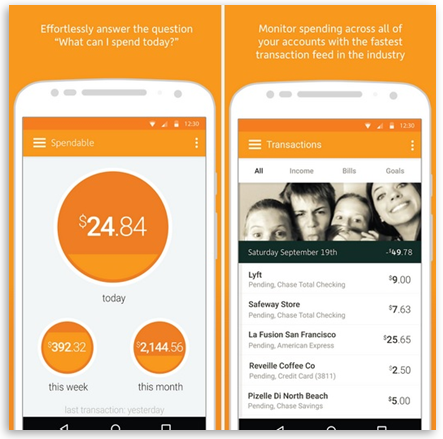
5. Level Money App

Once you have all of your estimated monthly bills, use the Level Money app to add them up and compare them against your monthly income. From here, the app will generate a monthly budget that can guide your financial decisions for budgeting expenses for things like entertainment, leisure, and shopping.


You're now in college. At last, you're free to do anything you want your parents have been restricting you to do when you were in high school. Now, you can have all the liberty to have all the party and booze, like the ones you see in the movies. But most of all, don't forget that college life is also about studying and learning new and worthwhile stuffs, too.

Aside from that, college life can also be confusing and challenging at the same time. It can be difficult, at first, to find your footing in a social way. Thanks to technology, you can easily touch the World Wide Web with your own hands. Here is a collection of apps that will surely kick start your college social life.

Twitter
Don't be the only person in class who isn't updated with the world events. Use Twitter to keep yourself in the loop in both the academic and social aspects of your college life. In today's contemporary classrooms, you may even be asked to participate in class discussions via Twitter.

The app is available for free for iOS and Android devices.

Between
Are you someone whose attempting the long-distance relationship course? Kudos to you because that's not a small task to deal with. Relationship app Between can help you ease the separation anxiety by letting you send messages, voicemails, memos, and photos. A private timeline makes it easy to reminisce about the good old days with your significant other or loved one(s).

Between can be downloaded for free by iOS and Android users.

Skype
Video interviews are not going away any time soon -- so you might as well get a heads up now. Microsoft's Skype is a reliable way to connect with faraway family and friends via text, voice, and of course -- video.

It is available for free on iOS and Android devices.

LinkedIn
LinkedIn and all its nifty features makes connections a breeze -- for better or worse, college is a time of both personal and professional connections.

The LinkedIn app is available for free on the Internet, of course, but you can also get it for free for iOS and Android devices.

Afterlight and Over
These days, anyone with an Instagram account can call themselves an amateur photographer of sorts. But with these two apps, you can even make more beautiful pictures to put on your blog or social media accounts. Afterlight is an app that has lots of shape, formatting, and filters to make your pictures really beautiful. And Over is an amazing app that lets you put text on your pictures. What makes these two photo apps stand out specifically are that they are super sleek and classy, so really nothing that you do to your photos with both of them makes your pictures ten times better looking. Of course, these are more for your average Facebook/Insta use and not for professional photography per say, but anyone of any expertise can use them to make pictures really nice. With these apps, you won't be able to stop editing.

Meetup
Let's face it, when you graduate into the real world, you're not going to have all your friends living within a mile radius for you to hang out, party, or go to football games with. So realistically, if you are new to the place or the city, or even just interning for a couple of months somewhere, it helps to join a group who has similar interests or backgrounds. And that may sound terrifying, or Tinder-esque, but the whole point is to find an entire group of people to hang out with and get to know. So maybe consider taking a buddy with you, or ask around about activities, but give it a try so you'll get used to your new home.

Click here to download Meetup for free.


Summer don't last long enough for kids, and it can be a stressful time to get everything in order so that students have new clothes, school supplies, dorm stuff, and...back to school apps? According to a 2015 study, 77 percent of students reported that using tablets and smartphones has helped improve their grades, and 62 percent said that tech helps them feel more ready for class.

Below is our compilation of apps that will help you get back to school the right way. And since it's pretty common sense that students don't have much of a budget to work with, you can download all of these apps for free.

Evernote


Free: iOS, Apple Watch, Android, Windows

Evernote is considered as one of the most popular note-taking apps for quite a while. Its clean, uncomplicated interface makes it perfect for students wherein they can take notes, make to-do lists, set reminders, attach files, create agendas and access everything through any device. Evernote doesn't have a storage limit, but free users are limited to an upload limit of 60 MB per month. You also have to activate push notifications to sync all your notes when the app isn't running. The camera feature is highly useful, because it allows you to save any photo, document, Post-it note or business card.

Dropbox Mobile


Free: iOS, Android, Windows

As a student, you save, send, and lose a lot of files -- usually in the depths of your inbox. The free Dropbox Mobile app lets you store and share up to 2 GB of documents, photos, and videos in one secure location. It's easy to add notes to files you want to share, too, which is ideal especially when your group project seems to be taking forever. Recently, Dropbox partnered with Microsoft so that users can edit Microsoft Office files straight from their mobile phones and save them to their Dropbox accounts.

You may also want to consider Dropbox Paper, a collaboration platform that allows multiple people to edit the same document.

WolframAlpha


$2.99; iOS, Android, Windows
Meet your know-it-all bestfriend, which also happens to help Apple's Siri. Dubbed as the "Star Trek computer," WolframAlpha holds more than 10 trillion pieces of data and 50,000 equations. The app, which costs $2.99, uses these information to compute answers and generate reports on topics ranging from trigonometry and astronomy, to genealogy and mythology. It provides you with graphs, step-by-step explanations, and formula details.

EasyBib


Free: iOS, Android>

EasyBib takes over one of the most time-consuming parts of writing a research paper -- the bibliography. This app helps you format your list of references in more than 7,000 citation styles, including the most common APA and MLA formats. Just type in the name of the book and EasyBib will give you several options to choose from and then makes a citation for you. The app has a website that does the job just as well, but with the app you can take a picture of a book's bar code and then generate a citation for it.

My Study Life


Free: iOS, Android, Windows
The My Study Life is a free app that replaces any paper planner by keeping track of your workload across multiple platforms and devices. Manage your classes with week and day timetables, keep track of your tasks and upcoming exams in the cloud, and receive notifications to keep you updated with your exams and class schedules. The calendar is very easy to read, thanks to its clean interface and the ability to color code your classes.

Now you'll enjoy school more with My Study Life!

Tiny Scanner


Free: iOS, Android

Tiny Scanner is an app that is perfect in making sure your handwritten class notes are at least legible enough to send to a classmate. The app uses the camera on your phone or tablet to scan documents and export them into PDFs that you can email or save to your camera roll. You can also crop and color-correct your images before you export them into PDFs.


Being an open-source operating system, Android is susceptible to a lot of misconceptions. It may seem like a lie, but despite the things that Android has accomplished, there are still some that don't trust it due to those false myths and beliefs.

1. Switch to 2G to Save Battery Life

It is a fact that 2G use less power than 3G, however, constantly changing between the two will consume a significant amount of your device's battery. The best thing you can do is stick with one and take the necessary precautions so that you can save as much battery life as you possibly can.

2. Android is Too Complicated for Beginners


There are a number of users who think that Android is just too complicated and that they will have to struggle just to get the hang of it. Steve Ballmer's 2011 words didn't help when he said that you have to be a computer scientist to use it. The key is to start with simple tasks first, and then once you have mastered that, move onto more complicated things. Never try to do something you are not ready for. If you do run into something complex and you can't figure out, a Google search along with a couple of video tutorials should probably do the trick.

3. Task Killers are Greatly Needed for Android

We have all heard different forms of argument whether task killers are needed or not, but the reality is they could actually be harming your device. Task killers only tell you how much memory they are freeing up and don't tell you the number of CPU cycles the app uses. What's important here is the CPU and not the memory since it's the CPU that makes your device to act sluggish. You will actually be slowing down your Android device with these task killers since some of the apps you kill will start back up again, using your device's CPU.

4. Android is Infested With Malware


It's not true that the synonym for Android is malware. It's an open-source platform, but that doesn't mean that your device will be infected with malware the first five minutes you start using it. Android is secure enough, however there are some things you need to do (or don't do) to avoid your Android device from being infected with malware. Whenever you download an app and you feel that it's asking for too many permissions, say no to it and try to find another one. Always try to download apps from the Google Play Store and try to install a reliable security app. Do not click on suspicious emails or links while navigating using your device.

5. Android Lags or Crashes More Than iOS


You may have also heard that Android crashes and lags more than the competition. In the beginning, Android did lag, but which system didn't, right? When using Android you are more likely to experience crashes and lags right after downloading a new build of an app or getting a new version of Android.

The main factors as to why your Android device has these problems is because of excessive manufacturer customization to the software, not enough hardware power, and poorly optimized third-party apps. But if you are using a device with enough power and apps from the right sources, there's nothing you should worry about.