Showing posts with label ios. Show all posts


As back to school draws nearer for every school and university across the nation, it cannot be denied that more students are becoming aware that they will soon shoulder the burden of living on their own, and do their own daily living expenses. For some of us who have already experienced or are currently living on our own, we know that those estimates and budget lists go to the trash when the first bill arrives and reality slaps us hard in the face.

If you're planning of moving out on your own, you don't need to worry that much because there are already great tech tools out there that can help you come up with more accurate budgeting costs. So if you want living your life away from home easier, check out the list we have for you below.

1. Cost of living Calculator

The most important thing that you should know if you're planning to move out is to understand the average cost of living in the city you're moving in to. Even if you're moving from a suburb of the city you plan to move to, costs could very greatly due to market demand. So, in order for you to get a better and clearer idea of what your expenses might look like, try running your information via the cost of living calculator. This tool will help you get a general number in mind before into more personalized estimate tools.


2. Utility cost calculator

No matter who you are or where you move, utilities are an essential cost. This is why calculating costs for things like water, gas, and electricity prior to leaving the nest is an important step in identifying what your monthly spending will look like. Utility costs usually very depending on the time of the year, your intended usage, and your location. Smart energy-saving tips like moderately setting AC and heat settings and turning off the lights when you leave a room can help, but it can still be tough to control how much you will be spending.

You can use a utility cost calculator to help you calculate the average cost of electricity in your home based on the information you provide about your location, usage, and number of people in your household.


3. Insurance calculation tools

Not only as an important part of protecting your home, but renter/home insurance is also required by most rental situations and necessary to get a loan approval if you're planning to purchase a home. Although the cost of insuring your home is usually pretty low, it's still important for you to get an estimate for the service that you can figure in to your estimated living costs. And if by leaving your home means you'll also be required to pick up your auto insurance, you'll want to include the costs for that as well. Luckily, most insurance companies allow you to bundle your renter/home insurance with your car insurance plan.

To help you know how much your insurance might cost you per month, consider using an insurance calculator to determine your potential needs based on the coverage your specific situation requires.


4. Gas Buddy

Aside from those expenses mentioned, you also need to determine your overall spending in gas. Although it can be pretty difficult to predict exactly how much you'll be driving/spending on fuel, a rough estimate can help at least get an idea of the amount you will be spending on your daily commute to work and school in a new town or city. With this, use the Gas Buddy tool to assist you generate fuel cost estimates for the route you will be taking regularly. This will help you get a better visibility of how much you should add to your monthly expenses in terms of fuel.


5. Level Money App

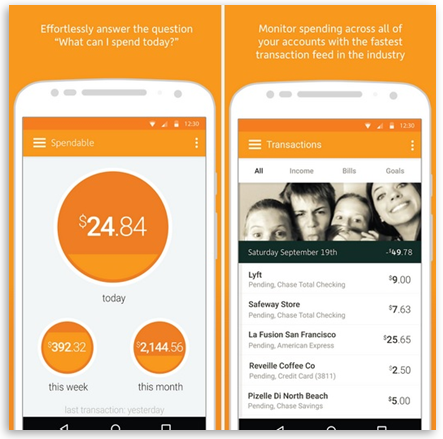
Once you have all of your estimated monthly bills, use the Level Money app to add them up and compare them against your monthly income. From here, the app will generate a monthly budget that can guide your financial decisions for budgeting expenses for things like entertainment, leisure, and shopping.


Summer don't last long enough for kids, and it can be a stressful time to get everything in order so that students have new clothes, school supplies, dorm stuff, and...back to school apps? According to a 2015 study, 77 percent of students reported that using tablets and smartphones has helped improve their grades, and 62 percent said that tech helps them feel more ready for class.

Below is our compilation of apps that will help you get back to school the right way. And since it's pretty common sense that students don't have much of a budget to work with, you can download all of these apps for free.

Evernote


Free: iOS, Apple Watch, Android, Windows

Evernote is considered as one of the most popular note-taking apps for quite a while. Its clean, uncomplicated interface makes it perfect for students wherein they can take notes, make to-do lists, set reminders, attach files, create agendas and access everything through any device. Evernote doesn't have a storage limit, but free users are limited to an upload limit of 60 MB per month. You also have to activate push notifications to sync all your notes when the app isn't running. The camera feature is highly useful, because it allows you to save any photo, document, Post-it note or business card.

Dropbox Mobile


Free: iOS, Android, Windows

As a student, you save, send, and lose a lot of files -- usually in the depths of your inbox. The free Dropbox Mobile app lets you store and share up to 2 GB of documents, photos, and videos in one secure location. It's easy to add notes to files you want to share, too, which is ideal especially when your group project seems to be taking forever. Recently, Dropbox partnered with Microsoft so that users can edit Microsoft Office files straight from their mobile phones and save them to their Dropbox accounts.

You may also want to consider Dropbox Paper, a collaboration platform that allows multiple people to edit the same document.

WolframAlpha


$2.99; iOS, Android, Windows
Meet your know-it-all bestfriend, which also happens to help Apple's Siri. Dubbed as the "Star Trek computer," WolframAlpha holds more than 10 trillion pieces of data and 50,000 equations. The app, which costs $2.99, uses these information to compute answers and generate reports on topics ranging from trigonometry and astronomy, to genealogy and mythology. It provides you with graphs, step-by-step explanations, and formula details.

EasyBib


Free: iOS, Android>

EasyBib takes over one of the most time-consuming parts of writing a research paper -- the bibliography. This app helps you format your list of references in more than 7,000 citation styles, including the most common APA and MLA formats. Just type in the name of the book and EasyBib will give you several options to choose from and then makes a citation for you. The app has a website that does the job just as well, but with the app you can take a picture of a book's bar code and then generate a citation for it.

My Study Life


Free: iOS, Android, Windows
The My Study Life is a free app that replaces any paper planner by keeping track of your workload across multiple platforms and devices. Manage your classes with week and day timetables, keep track of your tasks and upcoming exams in the cloud, and receive notifications to keep you updated with your exams and class schedules. The calendar is very easy to read, thanks to its clean interface and the ability to color code your classes.

Now you'll enjoy school more with My Study Life!

Tiny Scanner


Free: iOS, Android

Tiny Scanner is an app that is perfect in making sure your handwritten class notes are at least legible enough to send to a classmate. The app uses the camera on your phone or tablet to scan documents and export them into PDFs that you can email or save to your camera roll. You can also crop and color-correct your images before you export them into PDFs.